One lecture with MMTrader
Here is how a class runs, from the evening before to the debrief a week later. Tonight’s case is Bubbles and Momentum: a public fundamental that falls every round, and a price that runs anyway.
1Before class, the evening before
Pick the lesson, not the software.
Every case is one market set up to teach one idea. 56 ship with MMTrader, in 6 tracks you can follow in a course. Open one, change what you like, and it is ready for the room.
From the library
- TR1 Genie Bottles — Order-driven MarketsOne good, the genie bottle, trades in a single order book for fifty minutes. Every trader values a bottle differently, and the value drifts.IntroExperimental
- LS1 Liquidity ShockOne equity, ALGO, in three periods. A true value holds at 100.00, drops to 96.50 when a redemption notice goes to everyone thirty seconds into period two, and follows a random walk from there. Nobody sees it; informed computer traders trade toward it. Analysts receive a noisy estimate every minute.IntermediateEquities
- TR3 Multi-Asset Order-Driven MarketsTwo stocks trade side by side while three kinds of desk hold different information: asset exchangers working a switch between them, news desks following one stock each, and a proprietary trader reading the pair. STOCK1 opens with a call auction. Assessment happens after the session.IntermediateEquitiesBy NHH
Case setup
Bubbles and Momentum
From the preset library · 1 change
- Matching
- Continuous, price-time
- Asset
- ACME
- Rounds
2 × 20 min3 × 15 min- Fundamental
- Public, falls each round
- Fees
- 0 bps taker / maker
- Position limit
- ±200
- Bots
- Off
- Scoring
- Equity at fundamental
2Minute 0, 0:00 to 0:05
The whole room joins in five minutes.
Put the code on the projector. Students open the site on their laptops, type the code and their university email, and they are in. Nothing to install, no accounts to create. Late arrivals join the same way, and a student whose laptop drops rejoins the same seat, positions intact.
Bubbles and Momentum
Session code
130-452
MMTrader.org
Scan to join
Joined
16
Status
Open
MMTrader
Enter the session code and your email to begin.
Session code
One session found, 15 joined already
3The market runs, 0:10 to 1:15
They don't read about the spread. They pay it.
For the next hour, the theory on your slides happens to them. Every order lands in an order book, matched by price and time against the rest of the room. The three scenes below are yours to play, and they are the ones your students live through.
An order book for ACME. Best offer 100.11 for 7, next 100.12; best bid 100.09. The mid is 100.10.
Scene 1 of 3
Feel the spread
You are a student in the room, and you want 10 shares of ACME. The mid is 100.10. How do you buy them?
That was the short version. Your students get the full screen:
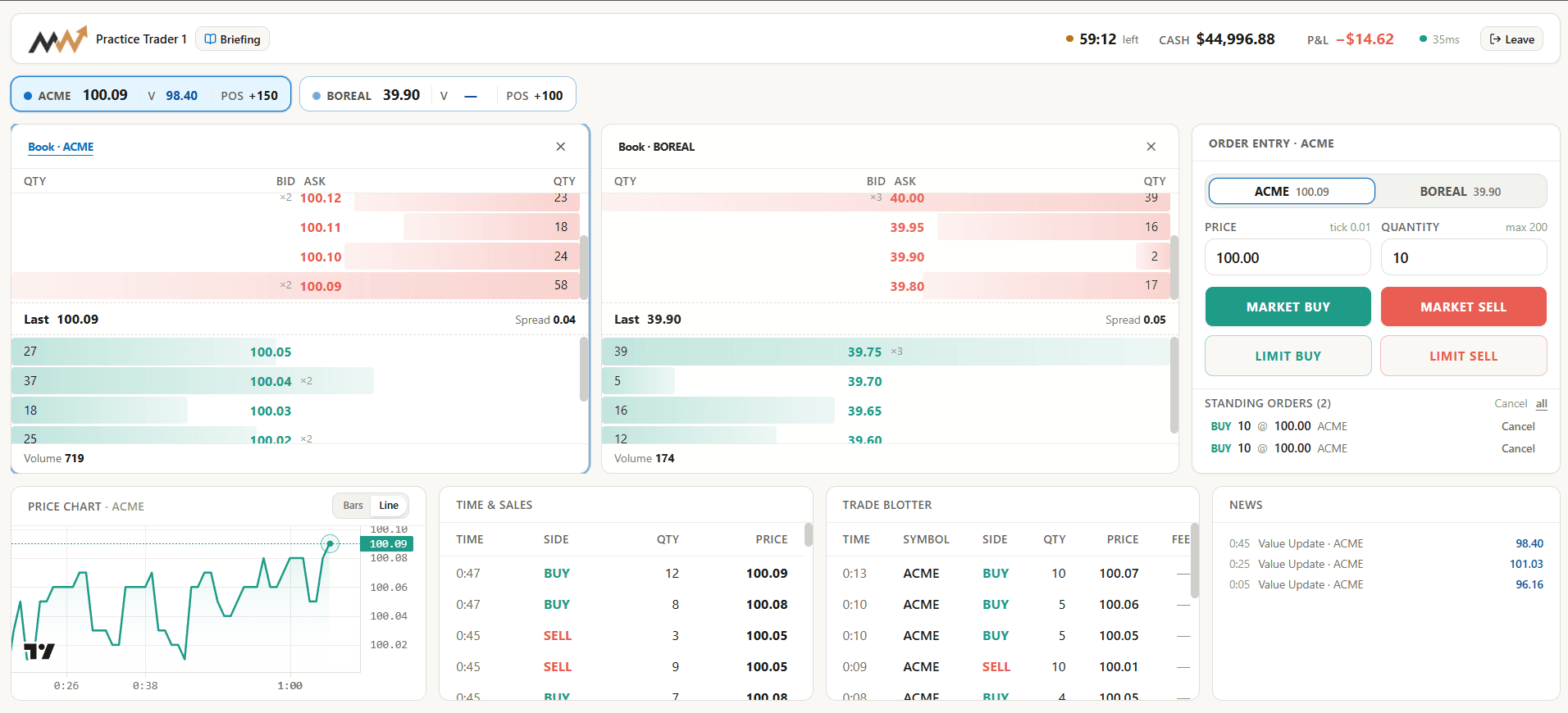
The market, from the front of the room.
The console shows who has joined, how the market is moving, and every change you make. Step in whenever the lesson needs it.
- Pause the market, or halt one asset
- Release news to everyone, or to one cohort
- Change fees, limits and rules while it runs
- End a round and start the next with new settings
Instructor console
TradingBubbles and Momentum
Round 2 of 3 · 08:42 left
Students
16
Orders
1,284
Trades
412
Release news
Log
- 10:31Position limit raised to ±300
- 10:24Round 2 started
- 10:23News released to all cohorts
This is such a significant upgrade to the trading class. My team had a lot of fun in the class and we were so eager to beat the class room.
Put your own room through it.
Get started4Next lecture, a week later
Then show them what they did.
Every order, quote, fill and rule change is logged. Open the next lecture with the class’s own market: where the price left its value, who paid for it, and who was on the other side. The same files work for grading and for research.
Session results
Bubbles and Momentum
Peak: 17% over the fundamental, 27 minutes in.
P&L by cohort
- Fundamental traders+1,240
- Momentum traders−1,860
Research & grading data
Six datasets, the metrics as analytics.json, and a README explaining every column. Roughly 6,147 rows.
Individual files
- ParticipantsCash, equity, score, rolecsv
- ExecutionsEvery print, side and feescsv
- Quotes (BBO)One row per top-of-book changecsv
- Order lifecycleFills, cancels, rejectionscsv
- Event logHalts and parameter editscsv
- Inventory pathsPosition steps with held timecsv